List.InsertRange Function in Power Query
The List.InsertRange function is a versatile M language function used to inject a sequence of values into an existing list at a specific position. Unlike simple concatenation which adds items to the end, List.InsertRange gives you precise control over where new data appears within your list structure.
Power Query uses zero-based indexing, meaning the first position in any list is index 0, the second is index 1, and so on. Understanding this indexing is key to placing your data exactly where it's needed.
Syntax
Parameters
- list: The target list where you want to insert the new items.
- index: A zero-based number representing the position where the insertion should start. If you specify 0, items are added to the very beginning.
- values: A list containing the actual values you want to insert. Even if you only want to insert one item, it must be wrapped in curly braces
{}to be treated as a list.
Return Value
The function returns a new list containing all the original items plus the newly inserted items at the specified index.
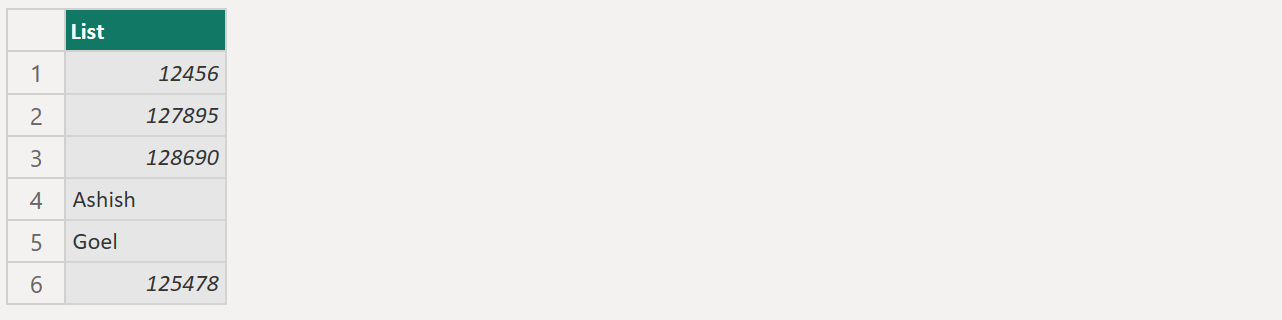
Example: Insert the given values in the list at index 3.
Power Query M
let
  source = {12456, 127895, 128690, 125478},
  return = List.InsertRange(source, 3, {"Ashish", "Goel"})
in
  return
The output of the above code is shown below: