List.Select Function in Power Query
The List.Select function is one of the most essential filtering tools in the Power Query M language. It iterates through a given list and returns a new list containing only the elements that satisfy a specific logical condition. Whether you're removing nulls, extracting numbers within a certain range, or identifying specific text patterns, List.Select provides the granular control needed for high-quality data preparation.
Syntax
Understanding the Selection Function
The selection parameter is a function that Power Query applies to every item in the list. You can write this in two ways:
• Explicit Lambda: (n) => n > 10. Here, n represents the current item.
• The "each" Keyword: each _ > 10. The underscore _ is a shorthand representing the current item. This is the most common syntax used in Power BI.
Example: Find the values in the list that are greater than 0.
Power Query M
let
    Source = List.Select({57, -38, 41, 49, -12}, (n) => n > 0)
in
    Source
The output of the above code is shown below:

Note: Lambda Function (n) => n > 0:
• This is an anonymous function (lambda) that takes a single argument n (representing each item in the list) and checks if n is greater than 0.
• If the condition is true (n > 0), the item is included in the result. If false, the item is excluded.
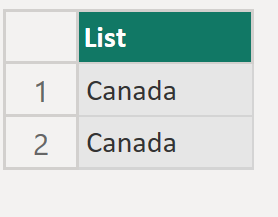
Example: Select the List elements that has the value “Canada” from the list.
Power Query M
let
  Source = {"India", "America", "Canada", "Japan", "Australia", "England", “Canada”},
  Return = List.Select(Source, each _="Canada")
in
  Return
The output of the above code is shown below: